
Watch the complete lifecycle walkthrough
20-minute documentation-backed lesson with the Odoo 18 interim settlement, Odoo 19/20 closing and accrual workflow, costing examples and migration checks.
Follow the same purchase-to-sale example through stock input/output settlement, invoice-driven valuation, stock closing, accruals and migration.
Documentation-backed training example; source screenshots are documentation illustrations, not a recording of this example in a live database. Main journals assume Anglo-Saxon automated/perpetual valuation, zero opening stock and no tax or price variance.
What changes, and what stays comparable?
| Question | Odoo 18 automated, Anglo-Saxon | Odoo 19/20 perpetual, ordinary purchase/sale |
|---|---|---|
| Receipt validated | Physical value increases; Dr stock / Cr input | Physical value increases; accounting waits for bill or closing |
| Vendor bill posted | Dr input / Cr payable; matches receipt | Dr stock / Cr payable in the equal-cost illustration |
| Delivery validated | Physical value decreases; Dr output / Cr stock | Physical value decreases; accounting cost waits for invoice or closing/accrual |
| Customer invoice posted | Dr COGS / Cr output, plus revenue/receivable | Dr COGS / Cr stock, plus revenue/receivable |
| Timing review | Open input/output documents and accrual needs | Stock closing, variation and four accrual review reports |
| Completed example | 6 units, stock $600, cost $400, revenue $600 | 6 units, stock $600, cost $400, revenue $600 |
These are accounting effects for the stated example. Dedicated loss/production accounts, other standards and price differences require separate treatment.
1. The change starts in Odoo 19
- Inventory still follows physical movement
- Perpetual accounting moves to invoices
- Closing + accruals explain the timing gap
Why can your warehouse show six units worth six hundred dollars while the inventory account shows a different number? The answer depends on your Odoo version and on whether you have completed the accounting close. In Odoo eighteen, automated valuation normally creates accounting entries when goods cross the company inventory boundary. Since Odoo nineteen, the ordinary perpetual purchase and sale workflow puts valuation accounting at invoice level, with closing entries to bridge the difference from physical inventory. The Odoo twenty documentation continues this model. In this lesson, we will follow one purchase and one sale through both designs, reconcile the numbers, then deliberately delay bills and invoices to explain closing and migration.
Reference: Odoo reference (20-finance) · Odoo reference (20-cheat).
2. Set up one controlled example
- Receive 10 units × $100 = $1,000
- Sell 4 units × $150 = $600 revenue
- Cost $400 · stock $600 · margin $200
Our company starts with no stock. We purchase ten training widgets at one hundred dollars each, receive all ten, then sell and deliver four at one hundred fifty dollars each. The sale therefore earns six hundred dollars of revenue. Its cost is four hundred, and six widgets remain, worth six hundred dollars. Gross profit is two hundred dollars. Use one company, one currency, a tracked goods product, and one-step receipts and deliveries. Keep cost at one hundred throughout. Exclude tax, discounts, freight, exchange differences, manufacturing and negative stock. These assumptions let us isolate accounting timing. The journals are an Anglo-Saxon automated or perpetual illustration; a Continental configuration can use different expense and counterpart accounts.
Reference: Odoo reference (20-finance) · Odoo reference (20-cheat).
3. Separate three configuration decisions
- Costing: Standard / AVCO / FIFO
- Accounting: Periodic / Perpetual
- Standard: Anglo-Saxon / Continental
There are three decisions to separate. Costing tells you how much a unit is worth: standard cost, average cost, or first in first out. Valuation accounting tells you when value reaches the general ledger: at closing or at invoicing in the new model. The accounting standard and localization determine expense recognition and account design. FIFO is not a synonym for automated accounting, and perpetual is not a costing method. Our constant unit cost gives the same four hundred dollar outbound cost with all three methods. Real purchases at different prices will not. Before comparing versions, record the company, product category, costing method, valuation method, stock journal and all relevant accounts. Otherwise an account configuration difference can look like a version change.
Reference: Odoo reference (20-finance) · Odoo reference (20-cheat).
4. Odoo 18: configure automated valuation
- Stock Valuation: inventory asset
- Stock Input: receipt ↔ bill
- Stock Output: delivery ↔ invoice
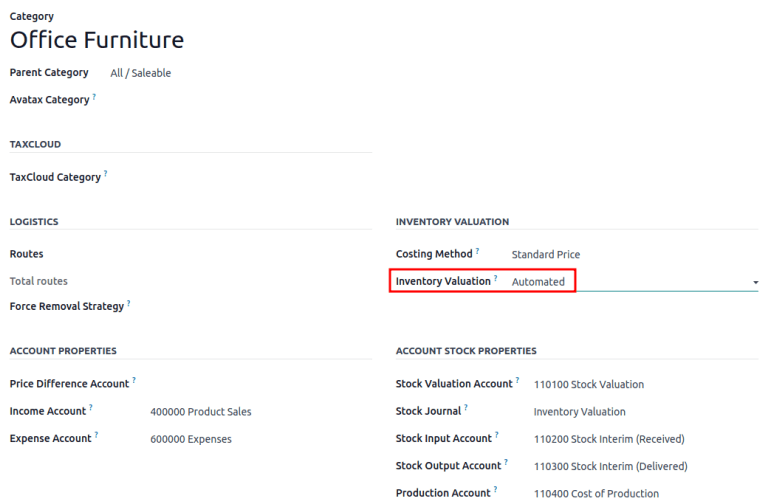
Start in Odoo eighteen. Enable Automatic Accounting in Inventory settings, and open the product category. Select automated inventory valuation. Configure the stock valuation asset, stock journal, stock input account and stock output account, plus the income and expense accounts. In our Anglo-Saxon illustration, input and output are distinct current asset interim accounts. Input bridges the time between receiving goods and posting the vendor bill. Output bridges the time between delivering goods and posting the customer invoice. The screenshot comes from the Odoo eighteen documentation. Its account names and numbers illustrate the interface; they are not the journal of our ten-widget example. Continental configurations need their own walkthrough because their input and output account design differs.
Reference: Odoo reference (18-config) · Odoo reference (18-using).
5. Odoo 18: purchase order and receipt
- PO confirmation: no valuation journal
- Receipt: Dr Stock Valuation $1,000
- Receipt: Cr Stock Input $1,000
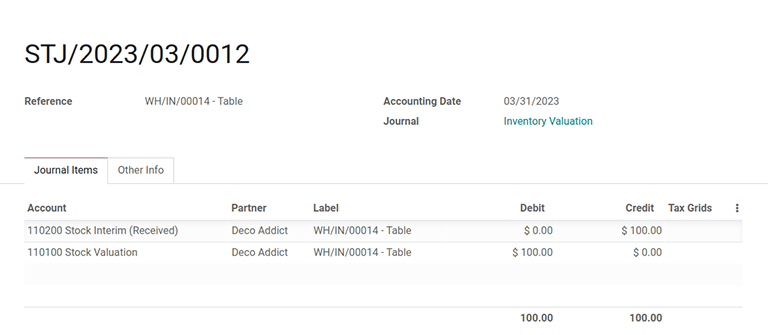
Confirm the purchase order for ten widgets at one hundred dollars. The order itself is a commercial commitment; it does not create the stock valuation journal in this example. Validate the vendor receipt into an internal company location. Quantity becomes ten and inventory value becomes one thousand dollars. Automated valuation also debits Stock Valuation by one thousand and credits Stock Input by one thousand. The credit in input tells accounting that we have received goods whose vendor bill has not yet cleared that bridge. Open the receipt valuation details and related journal entry. Check the product, quantity, value, company and date. The documentation screenshot demonstrates a stock valuation entry for its own sample product, not the amounts narrated here.
Reference: Odoo reference (18-config) · Odoo reference (18-using).
6. Odoo 18: vendor bill clears Stock Input
- Bill: Dr Stock Input $1,000
- Bill: Cr Accounts Payable $1,000
- Input $0 · inventory asset $1,000
Create the vendor bill from the purchase order for the same ten units and post it. In the simplified Anglo-Saxon automated setup, the bill debits Stock Input by one thousand dollars and credits Accounts Payable by one thousand. The receipt credited input; the bill debited input. Their amounts offset, and the relevant lines can be reconciled through the normal linked workflow. The inventory asset remains one thousand. We now owe the vendor one thousand. Paying the bill later debits payable and credits the bank; it settles the vendor debt, not the stock input bridge. This distinction matters: a paid bill does not by itself prove inventory valuation is reconciled. Always inspect the matched stock and bill lines.
Reference: Odoo reference (18-config) · Odoo reference (18-using).
7. Odoo 18: delivery uses Stock Output
- Delivery: Dr Stock Output $400
- Delivery: Cr Stock Valuation $400
- 6 units · inventory asset $600
Now confirm a sales order for four widgets at one hundred fifty dollars and validate the delivery. Inventory falls from ten units to six. Its value falls from one thousand to six hundred dollars. The automated stock journal debits Stock Output by four hundred and credits Stock Valuation by four hundred. We have moved cost out of the inventory asset, but we have not yet posted the customer invoice. Output temporarily carries that four hundred dollar debit. Revenue is still absent from this example's ledger until invoicing. If someone calls every delivery debit final cost of goods sold, ask which account was actually debited and which accounting standard the company uses.

Reference: Odoo reference (18-config) · Odoo reference (18-using).
8. Odoo 18: invoice clears Stock Output
- Dr Receivable $600 / Cr Sales $600
- Dr COGS $400 / Cr Stock Output $400
- Output $0 · gross profit $200
Post the customer invoice for four widgets at one hundred fifty dollars. The commercial lines debit Accounts Receivable by six hundred and credit Sales by six hundred. The Anglo-Saxon cost lines debit Cost of Goods Sold by four hundred and credit Stock Output by four hundred. The output debit from delivery and output credit from invoicing now offset. Stock input and stock output both have zero balance for our completed cycle. Inventory is six hundred, cost of goods sold is four hundred, revenue is six hundred, and gross profit is two hundred. Receiving customer payment clears receivable against the bank. It does not generate a second sale or a second cost charge.
Reference: Odoo reference (18-config) · Odoo reference (18-using).
9. Odoo 18: what settlement actually means
- Input: receipt credit + bill debit
- Output: delivery debit + invoice credit
- Investigate residuals by document
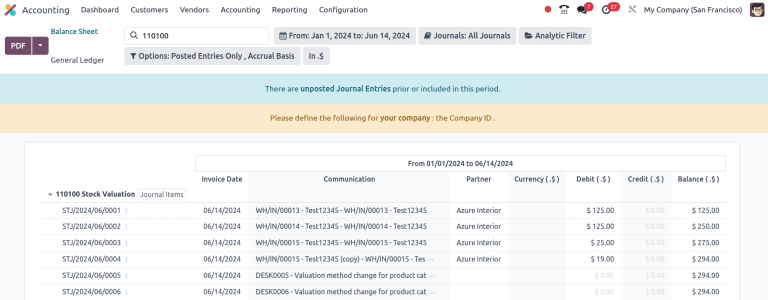
Settlement here means clearing the interim lines through the corresponding receipt and bill, or delivery and invoice. A zero account total is a useful check, but it can hide unmatched documents whose debits and credits happen to cancel. Review document references and reconciliation status as well. With partial billing, only the billed portion should clear. With a different bill price, standard-cost differences, returns or a different accounting date, the residual needs explanation. Do not write off an unexplained interim balance just to force zero. First inspect quantities, amounts, invoice linkage, returns, account overrides and the cutoff date. This is why a migration review needs open-item detail, not just one net balance per account.
Reference: Odoo reference (18-config) · Odoo reference (18-using).
10. Why Odoo changed the design
- Old: invoices + valuation entries per move
- New: invoices + closing adjustment
- Operational valuation remains available
The official valuation cheat sheet explains the reason for the Odoo nineteen redesign: entries for every stock movement increase journal volume and make the general ledger harder to review. The new workflow keeps physical stock valuation in Inventory while accounting uses invoices and a closing process. This changes the timing and location of evidence; it does not remove the need for accurate inventory records. A missing ordinary receipt journal in the new perpetual workflow can therefore be expected behavior. Verify the version and valuation configuration before calling it a defect. The useful comparison is the complete lifecycle through the close, including timing differences, rather than a screenshot taken immediately after just one receipt.
Reference: Odoo reference (20-finance) · Odoo reference (20-cheat).
11. Odoo 19/20: configure the new model
- Accounting → Configuration → Settings
- Perpetual (at invoicing) / Periodic (at closing)
- Valuation + Variation + Journal
In the documented Odoo nineteen and twenty workflow, open Accounting, Configuration, Settings, then Inventory Valuation. Choose Perpetual at invoicing or Periodic at closing. Configure the valuation account, its variation account, the stock journal and costing method. Review product-category overrides. The periodic closing process can be Manual, Daily or Monthly; the timing of that process is separate from the valuation method. Our main comparison uses perpetual and an explicitly reviewed close. The variation account can have different account types depending on the chosen accounting design. Do not simply rename the old Stock Input account and assume the migration is complete. This slide is a documentation-based navigation guide, not a captured screen from a new test database.
Reference: Odoo reference (20-finance) · Odoo reference (20-cheat).
12. New perpetual: receive, then post the bill
- Receipt: 10 units / physical value $1,000
- Bill: Dr Stock Valuation $1,000
- Bill: Cr Accounts Payable $1,000
Repeat the same purchase in the new perpetual model. The purchase order still does not itself recognize inventory accounting. Validate the receipt: Inventory now holds ten units worth one thousand dollars. In this ordinary purchase case, receipt validation is not the old automatic input-account journal trigger. Next post the vendor bill. In our simplified equal-cost perpetual illustration, debit Stock Valuation by one thousand and credit Accounts Payable by one thousand. The result after both documents matches the old completed purchase, but the route to that result differs. If the bill arrives after the reporting date, do not assume the accounting asset already equals the physical value. We will handle that situation with closing and accruals.
Reference: Odoo reference (20-finance) · Odoo reference (20-cheat).
13. New perpetual: deliver, then invoice
- Delivery: 6 units / physical value $600
- Invoice cost: Dr COGS $400 / Cr Stock $400
- Revenue: Dr Receivable $600 / Cr Sales $600
Deliver four widgets. Physical quantity becomes six and physical inventory value becomes six hundred dollars. Before the customer invoice is posted, the accounting inventory asset can still show one thousand in this simplified timeline. Post the invoice. Its commercial lines debit receivable and credit sales by six hundred dollars. Its cost reflection debits cost of goods sold and credits the stock valuation account by four hundred. There is no old stock output bridge in this new ordinary perpetual flow. The completed cycle again leaves inventory at six hundred and cost of goods sold at four hundred. The four hundred dollar temporary difference before invoicing is the timing gap that the close must explain if the reporting cutoff falls there.
Reference: Odoo reference (20-finance) · Odoo reference (20-cheat).
14. A report can be real time without a GL move
- Inventory: quantity and physical value
- Accounting: posted asset balance
- Closing: explain and align the difference
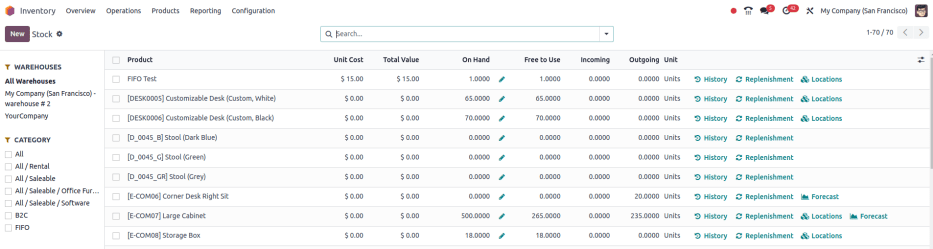
Open Inventory, Reporting, Stock and inspect the product's quantity and valuation. Then inspect the accounting stock valuation balance at the same date and for the same company. These are different views of the lifecycle. Physical value follows movement; accounting reflects posted documents and the closing process. The Odoo twenty stock-report screenshot is a genuine documentation reference. Its displayed products and values are not our ten-widget calculation. For a valid reconciliation, use consistent company scope, cutoff date, ownership, units of measure and currency. An internal transfer between two company-owned internal locations changes location quantities, but does not create new company stock value in this simple case. Consignment, intercompany movement and unusual location setups need separate treatment.
Reference: Odoo reference (20-finance) · Odoo reference (20-cheat).
15. Stock closing: generate, review, post
- Accounting → Review → Inventory Valuation
- Select As of date → Generate Entry
- Review draft Stock Closing → Post
The documented accounting report separates Initial Balance, Stock Variation and Ending Stock, with extra sections where relevant. Initial Balance is the accounting value. Ending Stock represents the physical target after the closing adjustment. Stock Variation explains the difference. Choose the correct As of date, generate the entry, review the draft Stock Closing journal and post it. The closing journal updates stock valuation and variation accounts. For example, if physical stock is six hundred but posted inventory is one thousand, the asset needs a four hundred dollar reduction. A simplified current-asset variation design debits Variation by four hundred and credits Stock Valuation by four hundred. This aligns the asset; it does not automatically explain revenue, unbilled liabilities or final expense recognition.
Reference: Odoo reference (20-finance) · Odoo reference (20-cheat).
16. Received but not billed at cutoff
- Physical $1,000 · posted stock $0
- Close: Dr Stock $1,000 / Cr Variation $1,000
- Accrual: Dr Variation $1,000 / Cr GRNI $1,000
Now reset to an isolated cutoff example: receive all ten widgets on the last day of the month, with no vendor bill. Physical inventory is one thousand dollars, but invoice-driven accounting has not yet recognized the purchase. In a simplified design using a current-asset variation buffer, closing debits Stock Valuation by one thousand and credits Variation by one thousand. The Bill To Receive review then supports an accrual: debit Variation by one thousand and credit the goods-received-not-invoiced liability by one thousand. Stock now shows the asset and GRNI shows the obligation. These are illustrative combined closing and accrual mechanics, not guaranteed line labels for every localization. Review the generated drafts, dates and configured accounts before posting.
Reference: Odoo reference (20-finance) · Odoo reference (20-cheat).
17. Delivered but not invoiced at cutoff
- Paid/billed stock $1,000 · physical $600
- Close: Dr Variation $400 / Cr Stock $400
- Cost accrual: Dr COGS $400 / Cr Variation $400
Use a second isolated cutoff example. The purchase is billed, and four widgets have been delivered, but the customer invoice has not been posted. Physical stock is six hundred dollars while the accounting asset is one thousand. Closing reduces the asset by four hundred through the variation buffer. Under the illustrated current-asset buffer design, recognizing the delivery cost then debits cost of goods sold by four hundred and credits Variation by four hundred. If the sale qualifies for revenue recognition at cutoff, a separate unbilled-revenue accrual may debit accrued receivable and credit sales by six hundred. Review the Invoices To Be Issued report and the generated accounting proposal. Asset alignment alone does not complete a revenue and expense cutoff review.
Reference: Odoo reference (20-finance) · Odoo reference (20-cheat).
18. Reverse accruals without double counting
- Review accrual reversal date
- Post the actual bill / invoice
- Re-run valuation; avoid duplicate adjustment
The next period is part of the demonstration. Review the reversal date on the accrual. When the real vendor bill or customer invoice is posted, confirm that the temporary recognition reverses and the actual document takes over. Do not manually copy last month's stock closing entry into the new period. Reopen the valuation report at the new cutoff and inspect the adjustment Odoo proposes. In the received-not-billed example, the later bill can increase stock accounting again; the valuation reconciliation must ensure the asset is not counted twice. Depending on the configured close and reversals, the generated adjustment resolves that difference. Verify the ending asset, variation buffer, GRNI or accrued receivable and profit and loss together. Never treat an illustrative journal as a substitute for the actual draft.
Reference: Odoo reference (20-finance) · Odoo reference (20-cheat).
19. Four timing reports to review
- Bill To Receive / Invoices To Be Issued
- Billed Not Received / Invoiced Not Delivered
- Review accounts + reversal date
There are four documented review directions. Bill To Receive covers receipts that lack a bill. Invoices To Be Issued covers deliveries that lack a customer invoice. Billed Not Received covers a bill before receipt. Invoiced Not Delivered covers customer invoicing before delivery. Select the As of date and relevant lines, then create accrual entries and inspect the account and reversal date. The last two cases can involve prepaid expense or deferred revenue treatment. Their exact journals depend on recognition policy, accounting standard and localization, so this lesson does not invent one universal posting for them. The key is to examine both physical-first and invoice-first transactions rather than treating every valuation difference as received-not-billed.
Reference: Odoo reference (20-finance) · Odoo reference (20-cheat).
20. Periodic valuation: the same final economics
- Bill: Dr Purchases $1,000 / Cr Payable $1,000
- Close: Dr Stock $600 / Cr Variation $600
- Net expense $400 · stock $600
Now compare periodic valuation in a simplified Continental-style expense and stock-variation design. The vendor bill debits Purchases or Expense by one thousand dollars and credits payable by one thousand. Receipts and deliveries continue to update physical stock, leaving six units worth six hundred. With zero opening stock, the closing entry debits Stock Valuation by six hundred and credits the configured stock-variation expense account by six hundred. Purchase expense of one thousand less the six hundred stock increase leaves net expense of four hundred. Revenue remains six hundred and gross profit two hundred. This is a simplified net-effect illustration. Existing opening stock, previous closing entries and localization can change the journal structure. Daily or monthly scheduling automates the close; it does not turn periodic into invoice-driven perpetual.
Reference: Odoo reference (20-finance) · Odoo reference (20-cheat).
21. Costing differences survive the redesign
- Receive 8 @ $10, then 4 @ $16
- Deliver 10: AVCO cost $120; stock $24
- FIFO cost $112; stock $32
Change the prices and costing becomes visible. Receive eight units at ten dollars, then four at sixteen. Total acquisition value is one hundred forty-four. Average cost becomes twelve per unit. Deliver ten: average costing charges one hundred twenty and leaves twenty-four. FIFO consumes the eight ten-dollar units and two sixteen-dollar units, charging one hundred twelve and leaving thirty-two. If standard cost stays ten, the physical standard-cost valuation for twelve units is one hundred twenty, the outbound standard cost is one hundred, and the remaining two units are twenty; purchase-price differences need their configured treatment. The accounting redesign changes posting timing, not these methods into the same result. Physical picking order is also a separate choice from valuation costing.
Reference: Odoo reference (20-finance) · Odoo reference (20-cheat).
22. Exceptions: scrap and production
- Ordinary receipt/delivery is the main comparison
- Loss / production location accounts matter
- Returns, landed costs, FX need separate checks
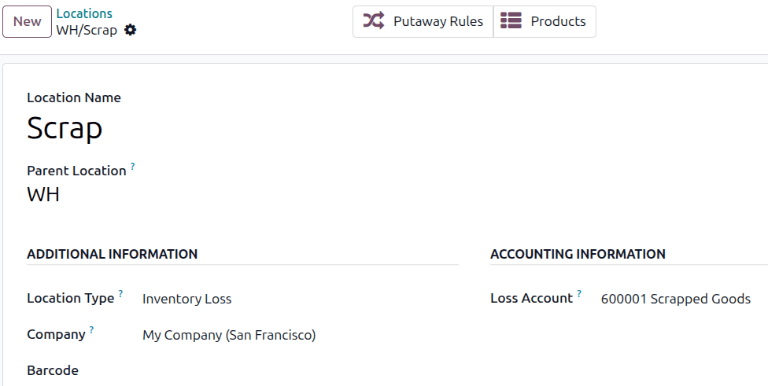
Do not teach that no stock operation can ever post accounting in Odoo nineteen or twenty. The documented perpetual setup can update valuation immediately for inventory loss and manufacturing with dedicated location accounts. The Odoo twenty scrap screenshot illustrates that exception: a configured loss location can route the loss to its own account. Production can use a Cost of Production counterpart. Returns, landed costs, vendor price differences, foreign currency, negative stock and category changes also need their own tests. A transfer between company-owned internal locations is not the same as a vendor receipt, customer delivery, scrap movement or manufacturing consumption. Our main comparison is deliberately the normal purchase and sale lifecycle, and these exceptions prevent that teaching rule from becoming misleading.
Reference: Odoo reference (20-finance) · Odoo reference (20-cheat).
23. Migration: preserve the old open items
- Snapshot stock, GL and open interim lines
- Reduce legitimate unbilled / uninvoiced items
- Rehearse each company on an upgrade copy
A migration is not finished when the new settings screen appears. Before upgrading, preserve stock quantities and values, the general ledger, and open Stock Input and Stock Output items with their purchase and sale references. Post valid outstanding bills and invoices where appropriate to reduce the open balances; do not manufacture documents just to clear accounts. The Odoo documentation states that the old input and output accounts are no longer used in the new Anglo-Saxon perpetual flow. Their nonzero balances need rebalancing through Stock Valuation, followed by the new valuation and accrual review. Rehearse on an upgrade test database, one company at a time. Preserve debit and credit directions and open-item evidence rather than moving an unexplained net amount.
Reference: Odoo reference (20-finance) · Odoo reference (20-cheat).
24. Migration: rebalance, close, then accrue
- Company action: Stock Valuation rebalance interim Accounts
- Review and post the draft rebalance
- Generate closing → review accruals → reconcile
The documented preferred route is after upgrading, using the company action named Stock Valuation rebalance interim Accounts where available. It generates a draft for review. Confirm the old interim balances become zero and the counterpart reaches Stock Valuation. Next generate the inventory valuation closing adjustment so the asset returns to the physical stock target and the timing amount reaches Variation. Then create the relevant accruals if closing requires GRNI or other recognition. Here is a concrete receipt-only illustration: legacy stock is one thousand and input is a one thousand credit. Rebalancing debits Input and credits Stock Valuation by one thousand. New closing restores the physical one thousand asset through Variation; the GRNI accrual recognizes the liability. Verify the whole chain, not just the intermediate zero asset balance.
Reference: Odoo reference (20-finance) · Odoo reference (20-cheat).
25. Run an evidence-based acceptance test
- Completed cycle: 6 units / stock $600
- COGS $400 / sales $600 / margin $200
- Explain every interim or variation residual
For acceptance, capture the company and product-category configuration, purchase order, receipt, vendor bill, delivery, customer invoice, stock report, journal items, general ledger and closing draft. Repeat with an unbilled receipt and an uninvoiced delivery spanning the reporting cutoff. Record accrual reversals and the later actual documents. The completed simple cycle must show six units, inventory of six hundred, cost of four hundred, sales of six hundred and gross profit of two hundred. In Odoo eighteen, explain and reconcile input and output. In the new model, explain valuation and variation through closing and accruals. Perform this in a test database before applying conclusions to a particular company's books. These deliverables are a worked documentation lesson, not a claim that those database tests have already been executed.
Reference: Odoo reference (20-finance) · Odoo reference (20-cheat).
26. Read the lifecycle, not one journal
- 18: movement → interim → invoice settlement
- 19/20: invoice → closing → accrual review
- Reconcile stock + GL + cutoff evidence
The practical lesson is to read the full lifecycle. Odoo eighteen's familiar automated purchase and sale flow connects stock movement to input or output, then clears that bridge at billing or invoicing. The newer perpetual design connects valuation accounting to invoices and uses closing plus accrual review to explain physical timing differences. Periodic valuation remains a distinct accounting choice, and costing remains a distinct calculation choice. Use the same example, the same company scope and the same date when checking your own system. I am Vinay Rana from VPerfectCS. You can use the companion article, source references and test checklist to discuss your upgrade and reconciliation process with your implementation and accounting teams.
Reference: Odoo reference (20-finance) · Odoo reference (20-cheat).
Sources and credit
Explanation and worked journals: VPerfectCS / Vinay Rana. Interface screenshots: Odoo documentation, referenced below. The original widget supplied the topic and purchase/receipt/delivery structure. Account names and journals are illustrative; verify generated entries for the actual company configuration.
Discuss your Odoo implementation or migration with VPerfectCS