
Construction profitability depends on keeping estimates, site progress, subcontractor commitments, certified work, invoicing, advance recovery, and retention connected. The VPCS Construction Industry application brings that complete operating cycle into Odoo 19.
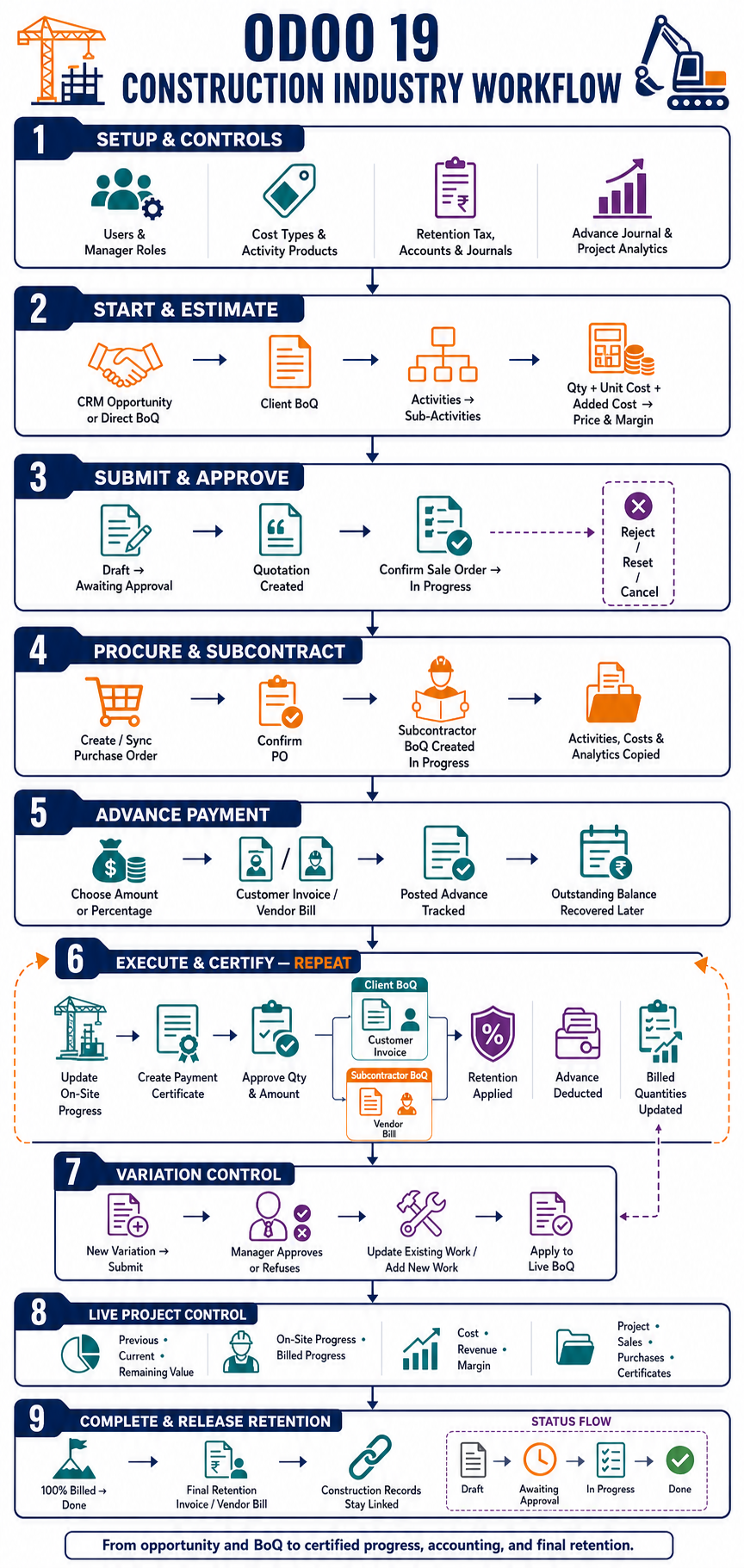
Why construction teams outgrow disconnected spreadsheets
A construction estimate does not stop being relevant when a contract is awarded. Its activities, quantities, costs, and margins should remain the commercial baseline for purchasing, subcontractor work, site progress, payment certificates, customer invoices, vendor bills, variations, and final retention. When each department maintains a separate version, teams lose time reconciling figures and risk certifying or billing against outdated information.
The Construction Industry module makes the Bill of Quantities the operational backbone. It supports client and subcontractor BoQs while linking the records that standard Odoo applications already manage: CRM opportunities, quotations, sale orders, purchase orders, projects, analytic accounts, customer invoices, vendor bills, taxes, and journals.
1. Establish construction-specific financial controls
Before a project starts, administrators configure Construction User and Construction Manager access, activity products, reusable cost types, retention taxes and accounts, advance-payment and retention journals, and project analytics. These controls determine who can approve sensitive changes and how construction transactions reach Accounting.
Cost types can be defined at BoQ level and cascaded to sub-activities. Each sub-activity can combine base cost with additional cost categories, planned quantity, unit price, and margin. This gives estimators a structured cost model without separating the commercial figure from the project record.
2. Build the client BoQ from CRM or directly
A user can start from a CRM opportunity using Create BoQ, or create a BoQ directly. The document records the customer, project dates, currency, project link, BoQ type, and accounting settings. Parent activities organize the contract scope, while sub-activities hold the detailed quantities, costs, prices, and work progress.
The module continuously aggregates sub-activity information upward. Project teams can see the total value, previous and current certified amounts, remaining value, on-site progress, billed progress, and calculated margin at the BoQ level.
3. Move from estimate to an approved commercial order
The primary client lifecycle is Draft → Awaiting Approval → In Progress → Done. Submitting the BoQ creates a linked quotation from its activity lines. Confirmation of that Sale Order moves the BoQ into progress and allows the related Odoo project and analytic account to become part of the operational chain.
Exception paths remain visible. Authorized users can reject, reset, or cancel the BoQ where the current state allows it. Chatter and activities provide an audit trail around approvals and operational decisions.
4. Connect procurement and subcontractor delivery
The client BoQ can feed a linked Purchase Order. Users can synchronize the BoQ activities, prices, taxes, cost types, and analytic distribution to the purchase lines. When a BoQ purchase order is confirmed, Odoo creates an in-progress Subcontractor BoQ for that vendor.
The subcontractor document copies its activity and sub-activity structure, including quantities and cost details. This produces two coordinated commercial views: the client side that drives customer billing, and the subcontractor side that drives vendor certification and bills.
5. Track advance payments and their recovery
For either BoQ type, users can enter an advance as an amount or percentage. The configured journal determines whether Odoo creates a customer invoice or a vendor bill. Once posted, the advance amount and outstanding balance are tracked against the BoQ.
Later payment certificates calculate an advance deduction based on the approved work and remaining recoverable advance. The deduction is capped at the outstanding balance, preventing the project from recovering more than was advanced.
6. Turn site progress into payment certificates
This is the recurring heart of the workflow. Site teams update current and previous quantities and on-site progress. Creating a Payment Certificate captures the sub-activities that still have current quantities available. The certificate reviewer approves quantities and amounts before submission.
Submitting an approved certificate creates the appropriate accounting document:
- Client BoQ: a customer invoice linked back to the Sale Order lines.
- Subcontractor BoQ: a vendor bill linked back to the Purchase Order lines.
The accounting document includes the approved activity value, applicable product taxes, retention tax, analytic distribution, and any advance-payment deduction. The approved quantities then move from current to previous, updating the BoQ’s certified amounts and billed progress. The cycle repeats as site work continues.
7. Keep variation orders under control
Construction scope changes are handled through a dedicated approval request. A variation can propose updates to existing sub-activities or introduce new work. It moves from To Submit to Submitted, after which a Construction Manager can approve or refuse it.
Only the explicit Apply Variation Order action changes the live BoQ. Approved edits update the selected activity type or quantity, while approved new lines are attached to the correct parent activity. Supporting documents can remain attached to the approval request.
8. See operational and financial progress together
Because every certificate, invoice, bill, sale, purchase, and variation stays linked to the BoQ, managers can navigate from the project baseline to its downstream records without reconstructing the relationship manually. Weighted on-site progress shows physical delivery, while billed progress shows the certified commercial position.
The result is a shared control point for project managers, quantity surveyors, procurement teams, finance teams, and management. Each team works in the relevant Odoo application while using the same construction data.
9. Complete the project and release retention
When work and certification are complete, the BoQ is marked Done. The module then enables creation of a single final retention document using the configured retention journal and account. Client projects create a customer invoice; subcontractor projects create a vendor bill.
The completed record retains access to its project, Sale Order, Purchase Orders, payment certificates, accounting documents, advance payments, and approved variations—providing a coherent commercial history from opportunity through final settlement.
A reusable Odoo foundation for construction operations
The module does more than digitize a BoQ. It creates an end-to-end bridge between estimating, approvals, procurement, project execution, subcontractor management, progress certification, and accounting. Organizations can extend the same foundation with their own approval limits, reports, dashboards, localization, or integration requirements without rebuilding the core data flow.
One construction baseline. Every commercial and project transaction connected to it.
Plan your construction workflow with VPerfectCS
VPerfectCS can help assess your estimating, certification, subcontractor, retention, and accounting processes; configure the module for your organization; and extend it for local operational requirements. Contact our Odoo team to arrange a workflow demonstration or implementation assessment.
Purchase the Construction Industry App
Ready to manage BoQs, subcontractors, progress certificates, advance recovery, variations, and retention in Odoo 19? View the complete app listing and purchase the module from the VPCSCloud Apps Store.
View App & Purchase