
Long-running projects rarely fit a single invoice. The VPCS Progressive Payment Terms app for Odoo 19 connects contract milestones, delivered quantities, project tasks, customer invoices, payments, and balance carryforward in one controlled billing schedule.
Why milestone billing needs more than ordinary due dates
Standard payment terms are excellent for splitting an invoice into due-date installments. Project businesses often need something different: invoice only when a commercial or delivery milestone is ready, limit billing to eligible Sale Order lines, carry any difference into future milestones, and preserve a clear link between the contract, project work, invoice, and payment.
Progressive Payment Terms adds that operating layer to Odoo Sales, Accounting, Projects, Timesheets, and Analytic Accounting. It is designed for construction, engineering, implementation, manufacturing, consulting, and other contracts where billing follows measurable delivery.
1. Configure a reusable progressive payment plan
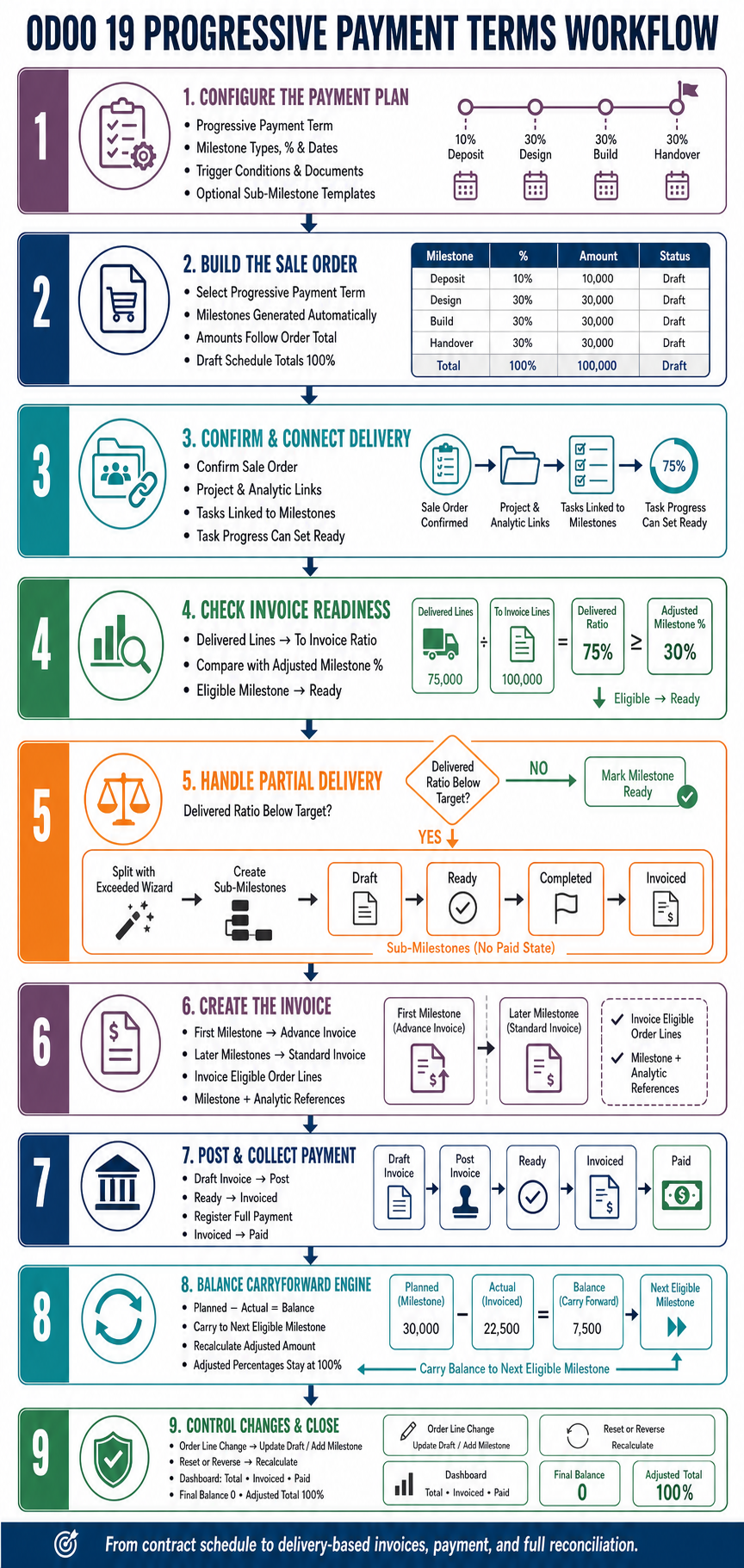
Administrators mark an Odoo payment term as progressive and define its milestone lines. Each line can specify a sequence, milestone type, percentage or fixed amount, planned timing, trigger condition, required documents, and whether sub-milestones are allowed.
Reusable sub-milestone templates can divide a large contractual stage into smaller delivery events. Configuration validation protects the percentage range and schedule total before the term is used commercially.
2. Generate milestones directly from the Sale Order
When a progressive payment term is selected on a quotation, Odoo generates the corresponding payment milestones. Planned amounts follow the Sale Order total, and planned dates follow the configured term timing. Changing the order total recalculates milestone amounts while the order remains editable.
The Sale Order becomes the central control view for total milestone value, invoiced milestone value, paid milestone value, overall progress, and the ratio of delivered lines currently ready to invoice.
3. Confirm the order and connect project delivery
Order confirmation preserves or generates the progressive schedule. Through the project integration, payment milestones can be linked to project tasks and analytic accounts. Task progress contributes to combined milestone progress, and completion of linked tasks can move a draft milestone to Ready.
Smart buttons let Sales, Project, and Accounting users move between the Sale Order, milestones, tasks, and invoices without losing the commercial relationship.
4. Compare delivered work with invoice readiness
The module calculates a To Invoice Ratio from delivered Sale Order lines that have quantities ready for invoicing. Down-payment and balance entries are excluded from this delivery calculation. The resulting ratio is compared with the milestone’s adjusted percentage.
An eligible milestone follows the parent lifecycle Draft → Ready → Invoiced → Paid. Cancelled remains an explicit exception state. This separates operational readiness from accounting posting and cash collection.
5. Handle partial delivery with sub-milestones
If the delivered ratio is below the target milestone percentage, the Milestone Exceeded wizard can split the available work into sub-milestones. This prevents the project from invoicing more than the delivered lines support.
Sub-milestones follow their own controlled lifecycle: Draft → Ready → Completed → Invoiced, with Cancelled as an exception. Their adjusted amounts and balances roll back into the parent milestone. Payment is tracked through the linked invoice and parent milestone; sub-milestones intentionally do not have a separate Paid state.
6. Create the correct customer invoice
The first qualifying milestone can use advance/down-payment behavior. Later milestones use the extended standard invoice wizard and select the eligible Sale Order lines. Milestone identity, source order, income account, and project analytic distribution remain connected to the generated customer invoice.
The invoice is created in draft so Accounting retains its normal review and posting control. Creation, posting, and payment remain distinct events in the workflow.
7. Synchronize posting and payment states
Posting a milestone invoice moves an eligible parent milestone from Ready to Invoiced. When the linked invoice becomes fully paid, the milestone moves to Paid. Sale Order totals then show how much of the schedule is planned, invoiced, and paid.
If payment becomes partial or is reversed, a previously Paid milestone can return to Invoiced. A scheduled status update also checks posted milestone invoices, helping the commercial schedule remain aligned with Accounting.
8. Carry billing differences into future milestones
Actual invoiceable delivery may differ from the original plan. The module stores the difference between planned and actual value as a milestone balance, then carries it to the next eligible milestone. Locked, invoiced, or paid milestones are protected while the remaining schedule absorbs the difference.
The engine recalculates the next milestone’s adjusted amount and adjusted percentage while preserving the original planned values for auditability. Across active milestones, adjusted percentages remain reconciled to 100%.
9. Respond safely when the contract changes
Sale Order line creation and changes to quantity, price, discount, or taxes trigger schedule synchronization. If the last eligible milestone is still in Draft, its amount and percentage are updated. If all existing milestones are already invoiced or paid, the module can add a new draft milestone for the difference.
Reset and reversal workflows remove or reverse the relevant invoice/payment effects, restore the appropriate milestone state, and recalculate downstream balances. This preserves accounting integrity while allowing an authorized correction.
10. Close with a fully reconciled billing schedule
The milestone dashboard presents states, progress, planned amount, adjusted amount, invoiced value, paid value, and linked project activity. By the final milestone, the adjusted total matches the Sale Order, adjusted percentages reach 100%, and the remaining balance reaches zero.
That end state gives management a traceable answer to four questions: what was contracted, what was delivered, what was invoiced, and what was paid.
Invoice what is ready, carry forward what is not, and reconcile the complete contract automatically.
Where progressive payment terms deliver the most value
The workflow is particularly useful for construction stages, engineering deliverables, software implementations, consulting phases, equipment installations, and other projects with contractual billing gates. Because it extends standard Odoo records, teams keep the familiar Sales, Projects, and Accounting experience while adding the controls their contract requires.
Purchase the Progressive Payment Terms App
View the complete app listing and purchase the module from the VPCSCloud Apps Store.
View App & Purchase